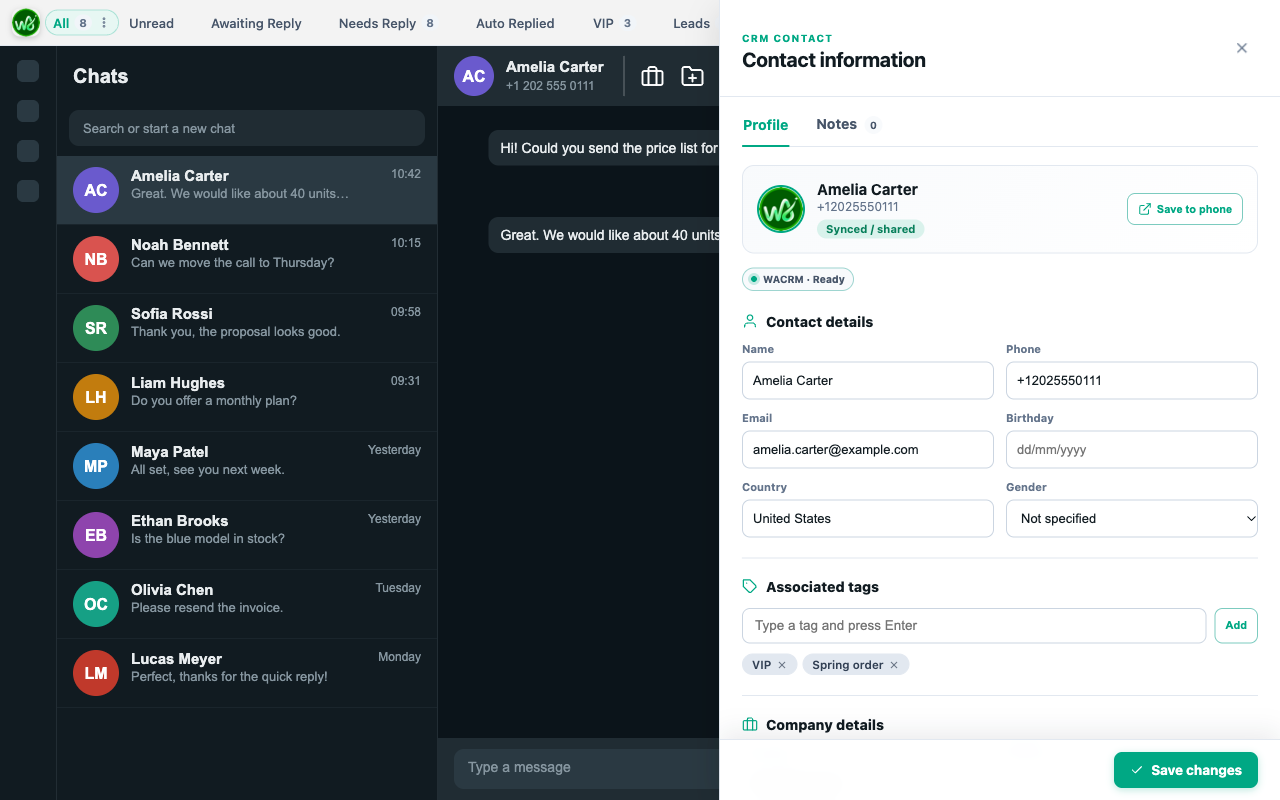
Contacts beside every chat
Open a conversation and see or edit that contact's details, tags, and notes in a side panel.

WhatsApp CRM
Chrome, Edge, Firefox, and Safari buildsA side panel for WhatsApp Web that keeps every contact, deal stage, and follow-up beside the chat. The free plan covers 25 contacts and one pipeline.
Built for WhatsApp follow-ups
Your CRM sits beside the conversation, so there is no tab switching and no copy-paste.
Open a conversation and see or edit that contact's details, tags, and notes in a side panel.
Move contacts through stages and keep each deal's value and status in one place.
Set a task on any chat so no conversation goes quiet.
Everything in one place
Save leads straight from WhatsApp Web, track each deal with its value and move it through sales stages. Keep notes, tags and tasks in one panel.
Read and reply in any language. Translate incoming chats and outgoing messages without leaving the conversation.
Share team templates with shortcodes, media and tabs so every agent answers fast and says the same thing.
Answer common questions on rules you set, with name and template variables filled in for each contact.
Queue messages for later and get follow-up reminders so no lead goes quiet.
Send a message to a tagged list of contacts. Keep your blacklist out of every send.
Connect HubSpot, Salesforce and Zoho, or push events to your own systems with webhooks.
Invite members, set sync permissions and share contacts, templates and settings on every device.
See member and contact performance by time range, so you know who replies and what converts.
Three-step workflow
OpenThe WACRM panel shows the active contact.
OrganizeAdd tags, notes, and a pipeline stage without leaving the chat.
Follow upSchedule a follow-up and track it from the web dashboard.
Privacy boundary
LOCAL
CRM data stays in your browser unless you connect a WACRM account to sync.
CLEAR
Catalog, checkout, and license requests do not include your WhatsApp contacts or messages.
YOU
Account sync is optional and starts only after you connect.
Questions
Aora WACRM
Keep contacts, stages, tags, notes, and follow-ups organized.